
Therefore often questions like "How to add contact forms on a page (static page) on Blogger?"
That's why this time we will discuss ways / techniques to use the Official Google Contact Form on Blogger Static Pages. in other words, this method does not create a new scheme to make visitors able to send emails to the blog owner, but by converting the default contact form widget blogger to a static page.
Advantages of Installing a Contact Page
If you don't have a contact us page, you should have one. Because by having a contact page, you will get several benefits at once:
- Your visitors will be able to comunicate faster and easier for best experience.
- When your blog traffic is huge, many advertiser might want to cooperate with you by placing ads on your blog. If you dont have Contact Page you will lose the oportunity.
- And alot more...
Steps to Install or Create a Contact Page on Blogspot:
1. Install contact form widgets (contact form).
For those who don't know, how to open the layout page >> Add gadget >> Contact Form. Then move it to a place that is deemed unobtrusive (because this widget will not be used / displayed).2. Eliminating contact form widgets (contact form).
In order the widget can not be seen by visitors, you need need to make modifications. The trick is, open the template menu and select edit html. Look for the widget named ContactForm.Find this code
<b:widget id="ContactForm1" locked="false" title=" Contact Form" type="ContactForm"></b:widget>.Double click on the code to open / expand it.
Erase all code betwen
<b:includable id="main"> ........ </b:includable>. see picture bellow.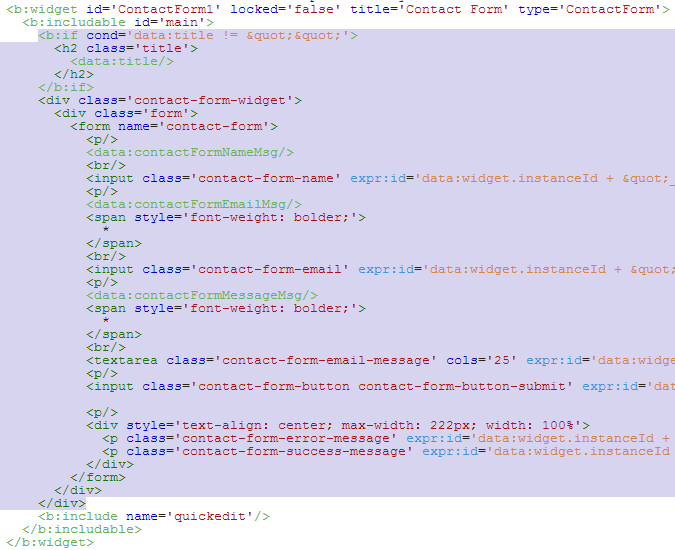
3. Add or Create a Contact Page
If you dont already create contact page before, you have to create one by click on New page

You can name it whatever you want, such as Contact Us, Contact Me, Contact Page
Choose HTML next to Compose tab, copy and paste code bellow

<table><tbody> <tr><td>Name</td> <td> <input class="contact-form-name" id="ContactForm1_contact-form-name" name="name" size="60" type="text" value="" /> </td></tr> <tr> <td> Email<span style="font-weight: bolder;"> *required </span></td><td> <input class="contact-form-email" id="ContactForm1_contact-form-email" name="email" size="60" type="text" value="" /> </td></tr> <tr> <td> Message<span style="font-weight: bolder;"> *required </span></td><td> <textarea class="contact-form-email-message" cols="60" id="ContactForm1_contact-form-email-message" name="email-message" rows="5"></textarea> </td></tr> <tr><td align="center" colspan="2"> <input class="contact-form-button contact-form-button-submit" id="ContactForm1_contact-form-submit" type="button" value="Send" /> </td></tr> <tr><td align="center" colspan="2"> <div style="max-width: 222px; text-align: center; width: 100%;"> <div class="contact-form-error-message" id="ContactForm1_contact-form-error-message"> </div> <div class="contact-form-success-message" id="ContactForm1_contact-form-success-message"> </div> </div> </td></tr> </tbody></table>
4. Done, now you have a Contact page on your blog
To make sure the page works properly, you may test it by sending message from your Contact page. Message will be received on Email used on Blogger.Thats How to Create a Contact Page on Blogspot. prety easy right?
If you feel this post is usefull please share it with your friends.

0 Comments